
Keeping costs under control in construction is not an afterthought. It determines whether your project becomes profitable or slowly slips out of your hands. Material prices fluctuate, schedules shift and extra work arises faster than you think. Without real-time visibility, you're quickly working behind the times.
With the right cost control software, you can prevent that. You get a grip on budgets, insight into deviations and an overview of all financial movements within your project.
In this guide you will read:
-
What exactly cost control software is
-
Why it is indispensable in modern construction projects
-
Which functionalities are really important
-
How Ed Controls helps you combine financial overview with quality assurance
.png?width=844&height=528&name=Ed%20Controls%20images%20(11).png)
What should good cost control software in construction meet?
Cost control in construction is not just about keeping track of numbers. It's about identifying risks early, substantiating choices and preventing surprises. A strong system actively supports you in this, rather than just recording.
These are important components to watch out for:
-
Continuous insight into expenses
You don't want to discover at the end of the month that the budget is under pressure. A good system will already show during the project how materials, labor and equipment compare to budget. -
Early detection of deviations
When costs fall outside the agreed bandwidth, this should be immediately visible. This allows you to make timely adjustments and keeps the financial impact manageable. -
Substantiated forecasts
Based on progress and previous projects, you should be able to estimate where you are moving financially. That helps you make decisions before deviations become structural. -
Clear management overview
Project leaders, management and administration each need different information. A flexible dashboard ensures that everyone has insight into the figures that are relevant to them. -
Control over deployment of people and resources
Costs are directly related to deployment. By properly monitoring labor, materials and equipment, you prevent waste and keep a grip on productivity. -
Connection to your existing processes
Cost control is not separate from your organization. It must fit in with your financial administration, planning and project structure. Only then will you work efficiently and avoid duplication of effort. -
Transparent management of changes
Additional work and adjustments are inevitable. A good system provides insight into the financial impact and ensures clear documentation to the client. -
Grip on cooperation with subcontractors
Clear registration of agreements, quotations and changes prevents discussions and unexpected costs afterwards.
In short, cost control software should help you look ahead instead of correcting afterwards. It gives structure to your project and ensures that financial control becomes part of your daily working method.
Compare different cost control software in construction
Keeping project costs manageable can be done in different ways: some tools focus primarily on financial administration and cost recording, while others improve collaboration, quality assurance and failure cost reduction, thereby controlling costs indirectly.
The best cost control software for construction projects
Cost control in construction can be approached in several ways. Some systems focus primarily on financial administration and budget monitoring. Other solutions help control costs through better collaboration, quality assurance and process structure.
Below are ten commonly used solutions within the construction industry, each with its own focus and positioning.
1. Ed Controls
Best for: quality assurance and reducing failure costs
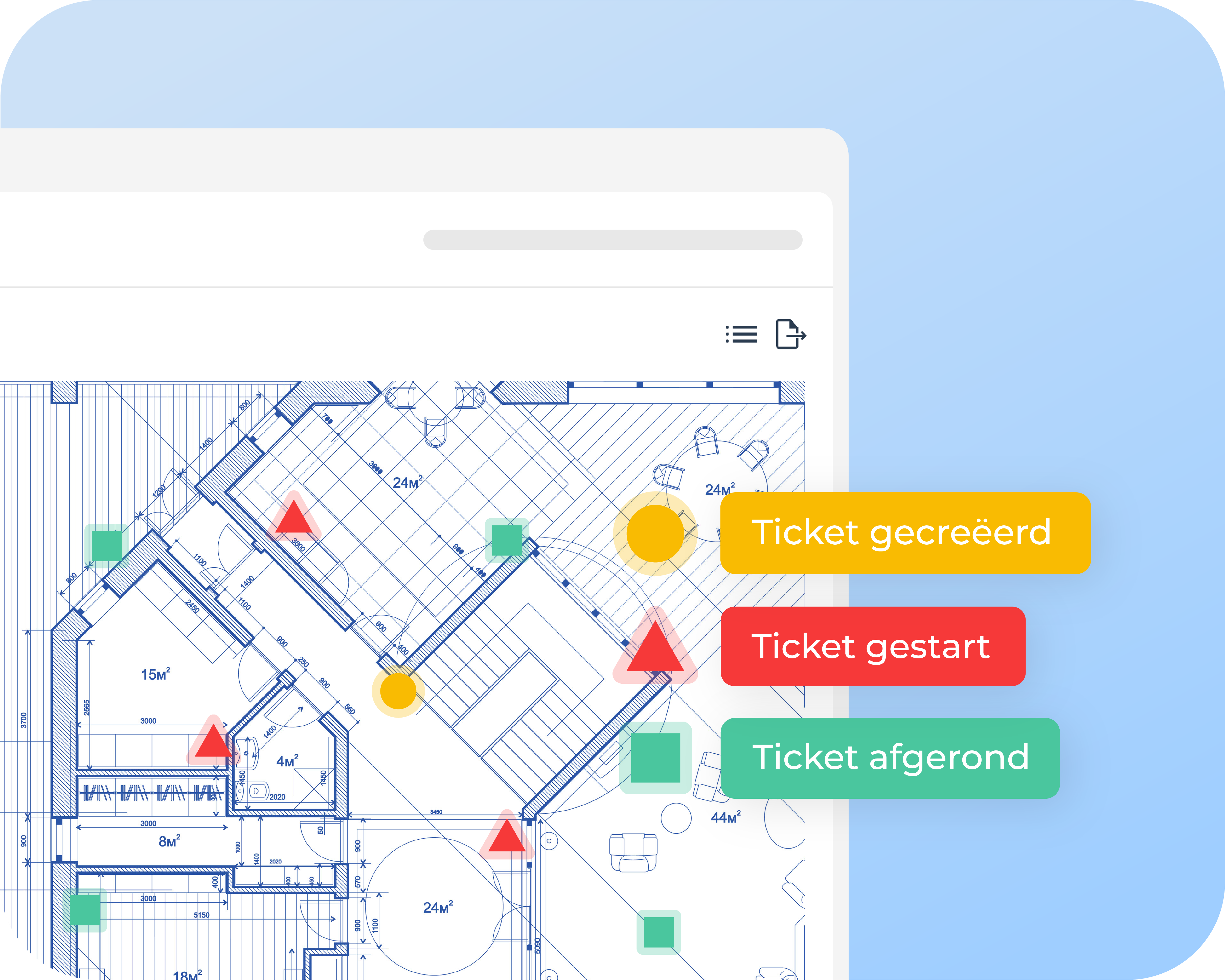
Ed Controls is a user-friendly platform for quality assurance, delivery management and project communication in construction. The system focuses not on accounting or financial administration, but on preventing failure costs through clear structure and central recording.
By providing real-time insight into deviations, completion points and tasks, you prevent problems from being pushed to later phases where repair becomes more expensive. Ed Controls helps construction companies to create overview, reduce miscommunication and record responsibility clearly.
Strengths
-
Completion points and tickets with real-time status
-
Photo documentation with location and time stamp
-
Central project environment for all parties involved
-
Insight into open items and responsibilities
-
Reduction of failure costs through better collaboration
Limitations
- No integrated accounting module
- No direct budget monitoring or financial forecasting
2. Procore
Best for: integrated project and cost management on large projects
Procore is a comprehensive construction platform that combines project management with financial control. It is used worldwide by medium and large contractors who need integrations, comprehensive reporting and centralized project control.
The system consolidates budgets, contracts, change orders and timekeeping into one environment. This creates a complete overview of project costs and progress.
Strengths
-
Budget tracking and cost reporting
-
Integrations with ERP and accounting systems
-
Role-based access control
-
Strong mobile support
Limitations
- Complex implementation
- Less suitable for smaller teams
3. Autodesk Build
Best for: linking office and construction site
Autodesk Build connects design, planning and execution within a single platform. The system helps construction companies centrally manage financial changes, progress and documentation.
With integrations with accounting systems and extensive workflow capabilities, Autodesk Build is especially suited for larger organizations that need in-depth control and data flow between departments.
Strengths.
-
More and less work management
-
RFIs and approval workflows
-
Integrations with financial systems
-
Real-time insight into budgets
Limitations
- Relatively high cost per user
- Less intuitive for smaller organizations
4. Fieldwire
Best for: task management and coordination on site.
Fieldwire is designed for on-site superintendents and construction teams. The platform supports task management, plan markings and progress monitoring, along with an additional budget module.
The system focuses primarily on daily operational efficiency on the construction site, where information can be shared and updated quickly.
Strengths
-
User-friendly task management
-
Plan markings and progress recording
-
Basic budget functionality
-
Strong mobile application
Limitations
- Less in-depth financial control
- Limited ERP integrations
5. Woub
Best for: planning and team communication
Woub supports construction companies in daily planning, timekeeping and internal communication. The system helps create an overview of ongoing work and team responsibilities.
The focus is primarily on practical execution support and less on comprehensive financial analysis.
Strengths
-
Digital work orders
-
Time recording
-
Team communication
-
Simple quality checks
Limitations
- No extensive financial reports
- Less suitable for complex project structures
6. STA Software
Best for: estimation and financial project management.
STA Software focuses heavily on estimation, working budgets and financial insight. The system supports construction companies in the preparation and management of budgets and contract variations.
It is mainly used by organizations that want to keep a grip on financial project control from the calculation phase.
Strengths
-
Calculation functionality
-
Working budgets
-
More and less work management
-
Financial reports
Limitations
- Less focus on daily construction site communication
- Implementation requires financial expertise
7. Let's Build
Best for: quality assurance and digital completion files.
Let's Build supports construction teams in recording defects, completion points and compliance documentation. The system helps structure quality processes.
The focus is strongly on digital capture and less on extensive financial functionalities.
Strengths
-
Defect management
-
Completion files
-
Checklists
-
Compliance support
Limitations
- No comprehensive budget monitoring
- Less suitable for full project administration
8. Pro4all
Best for: process control and document management.
Pro4all helps construction companies streamline processes and document flows. The system supports workflow automation and central document storage.
This creates more overview and less fragmentation of information within projects.
Strengths
-
Workflow automation
-
Document management
-
Reports
-
Process overview
Limitations
- Not a full-fledged financial ERP
- Less focus on execution details
9. Bouw7
Best for: integrated construction administration
Bouw7 offers a broad solution that brings together planning, administration and estimation. The system is suitable for medium-sized construction companies that want to centralize multiple processes.
It combines project administration with financial insights within a single platform.
Strengths
-
Project administration
-
Planning
-
Calculation
-
Purchase management
Limitations
- Less focus on quality assurance
- Interface less modern than some alternatives
10. 4PS Construct
Best for: ERP solution for larger construction companies
4PS Construct is a comprehensive ERP solution that focuses on financial control and operations within larger construction organizations. The system supports accounting, procurement, contract management and project monitoring.
It is especially suitable for organizations that need deep financial control and integrated business processes.
Strengths
-
Financial administration
-
Purchasing and contract management
-
Project monitoring
-
Reports
Limitations
- Complex implementation
- Especially suitable for larger organizations
Conclusion: why Ed Controls is the best solution for cost control software
Cost control in construction is about more than just numbers. It's about visibility, structure, collaboration and preventing unnecessary costs before they occur. Many tools try to control costs by diving deep into financial records. But in practice, most unanticipated costs arise not in accounting, but through:
- miscommunication between teams
- unclear delivery points
- incomplete recording of changes
- errors that are only discovered late
Ed Controls addresses those core problems directly.
What makes Ed Controls unique
- Real-time visibility of quality and progress Instead of figuring out afterwards what went wrong, you can already see during execution where risks arise. This prevents expensive repairs later.
- Unambiguous documentation and proof Photos, locations, time stamps and those responsible are consistently recorded. This prevents discussion about who did what and what the impact is.
- Better collaboration across teams Everyone works in the same platform, eliminating information scattered across separate documents, apps or emails.
- Direct effect on failure costs Failure costs are responsible for a large proportion of overruns in construction projects. By reducing them, Ed Controls creates direct financial impact, even before budgets are ever entered into the accounts.
- Easier to apply than ERP systems ERP tools are powerful, but complex and costly to implement. Ed Controls, on the other hand, offers rapid adoption and immediate value without heavy implementation processes.
For whom is Ed Controls ideal?
Ed Controls is the best choice if you:
- want to control costs by preventing errors and miscommunication
- Want clarity in delivery points, deviations and tasks
- Want teams to work together from a single source of truth
- Don't want to build an additional ERP infrastructure, but do want to see results on your projects
So, if your goal is to reduce failure costs, improve collaboration and get real-time control of what's happening on site, Ed Controls offers the most practical, immediate and results-driven approach of all the solutions in this overview.
Want to experience how Ed Controls helps your projects reduce failure costs and gain oversight from day one? Schedule a demo and find out for yourself.